Delta Force's Operations mode, also known as Hazard Operations or Extraction mode, is the core of the game’s adrenaline-pumping action. Whether you call it Operations or simply "raiding," the premise remains consistent—parachute into the map, gather valuable gear, and extract safely before rival players or AI enemies eliminate you. The unique aspect of this mode is that, similar to other extraction shooters, everything you carry into the game is at risk; if you perish, you lose it all.
This guide transcends mere survival tactics. It offers a comprehensive walkthrough of Operations mode, detailing how to approach a run, manage your equipment, and make strategic decisions to maximize your gains over time. If you're only interested in survival tips, we have a dedicated guide on our blog covering that aspect.
Whether you're venturing in solo or with a squad, understanding the mechanics is crucial to playing more effectively and efficiently.
What Operations Mode Actually Is
Operations mode in Delta Force is a dynamic PvPvE environment where each match presents a unique challenge. You, along with up to two teammates, enter a live map teeming with AI soldiers, loot locations, and competing teams. Your objective is to amass as much loot as possible and safely extract before being taken down by threats on the map.
Unlike typical shooter modes, there's no score to pursue. What you successfully extract contributes to your inventory outside the raid. Conversely, death results in the loss of all carried items, except for those secured in your Safe Box. This risk-and-reward dynamic is what fuels the intense atmosphere of Operations mode, whether you're scavenging for medical supplies or stealthily making your exit.
Loadout Planning and Inventory Control
The foundation of your success is laid before entering the map, through meticulous loadout planning. Every match incurs an entry fee, making your loadout choices pivotal. Essential gear like a helmet, armor, chest rig, and backpack are mandatory for deployment. However, the additional items you select will dictate your gameplay strategy.
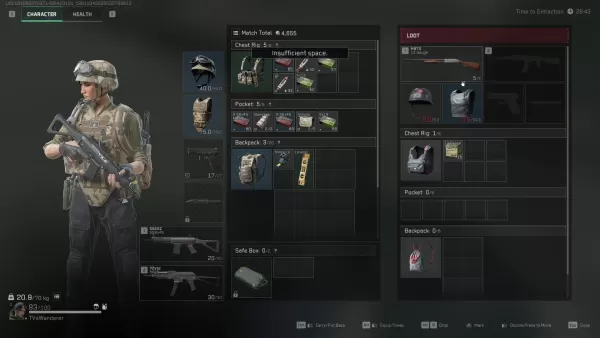
Extraction zones are generally fixed, though some maps feature dynamic elements such as elevators or enemy-controlled checkpoints. Plan your exit strategy in advance, especially when venturing deep into the map for loot.
Loot Smarter, Not Harder
In Operations mode, every item has a market value, but not all are worth the risk. Early on, focus on collecting healing items, weapon attachments, and rare electronics—these are compact, valuable, and can be stored in your Safe Box if necessary.
While heavy weapons and armor might seem appealing, they can encumber you and occupy valuable space. Only carry them if you're confident in your extraction or if you're close to an exit with nothing left to lose.
A useful strategy for newcomers is to steer clear of high-traffic loot areas during the initial minutes. Allow other teams to engage in combat, then scavenge their leftovers. If playing solo, focus on looting the outskirts of the map and revisit the center later. You'll often find valuable items left behind after intense team clashes.
Picking the Right Operative
Your Operative choice shapes your gameplay style in Operations mode. Not all Operators are suited for stealth or loot-focused strategies, so select one that aligns with your objectives.
Luna and Hackclaw excel in intelligence gathering and mobility. Luna can tag enemies and disrupt advances with her shock arrows, while Hackclaw moves silently and is adept at silent takedowns. Stinger, with his healing capabilities, is ideal for team plays, particularly when supporting more aggressive teammates.
Steer clear of Operatives with conspicuous or flashy abilities unless your strategy involves direct confrontation. Characters like D-Wolf are entertaining but tend to draw too much attention in a mode where staying under the radar often yields better outcomes.
Fight When It Matters
In Operations mode, choosing your battles wisely is more important than winning them. While PvP engagements can yield gear and XP, they also consume time and draw unwanted attention. Only initiate combat when necessary or strategically advantageous.
In the event of a firefight, keep moving and aim to resolve it swiftly. Leverage your Operative's abilities to gain an edge—Luna's detection arrow can reveal hidden foes, and Stinger's smokes can provide cover for healing or retreat.
Remember, you can loot fallen players later. If two teams are battling it out, consider hanging back and letting them weaken each other. Engaging as a third party is risky but can be one of the most effective ways to acquire gear without directly confronting every opponent.
Making the Most of Each Match
Each raid presents an opportunity to accumulate value, hone your skills, or gain new insights. Don't let a poor run discourage you; instead, use it to refine your approach for the next game.
Conserve your credits during a losing streak and play more strategically when you're on a roll. Upgrade your Safe Box early on, experiment with different Operative configurations, and familiarize yourself with the maps to identify the most lucrative loot routes.
As you progress, your focus will shift from mere survival to optimization. That's when Operations mode truly becomes enjoyable.
Operations mode in Delta Force is not just about looting and escaping; it's a strategic game of risk management, planning, and smart decision-making. Craft your loadout with intention, loot judiciously, and know when to engage or retreat. And remember, every setback is merely part of the journey that makes your first significant victory all the more rewarding.
For the best gaming experience, consider playing Delta Force on PC with BlueStacks. You'll benefit from quicker load times, precise controls, and easier gear management, making it the ideal way to stay competitive as you master the game.